
Open source · local-first · E2E encrypted sync
Copy once.
Available everywhere.
Memorafy is a clipboard manager for macOS and Windows. Capture everything you copy, search it instantly with Quick Paste, and optionally sync end-to-end encrypted across your devices.
Features
Everything your clipboard should do
Powerful capabilities designed to keep you in flow, without getting in your way.
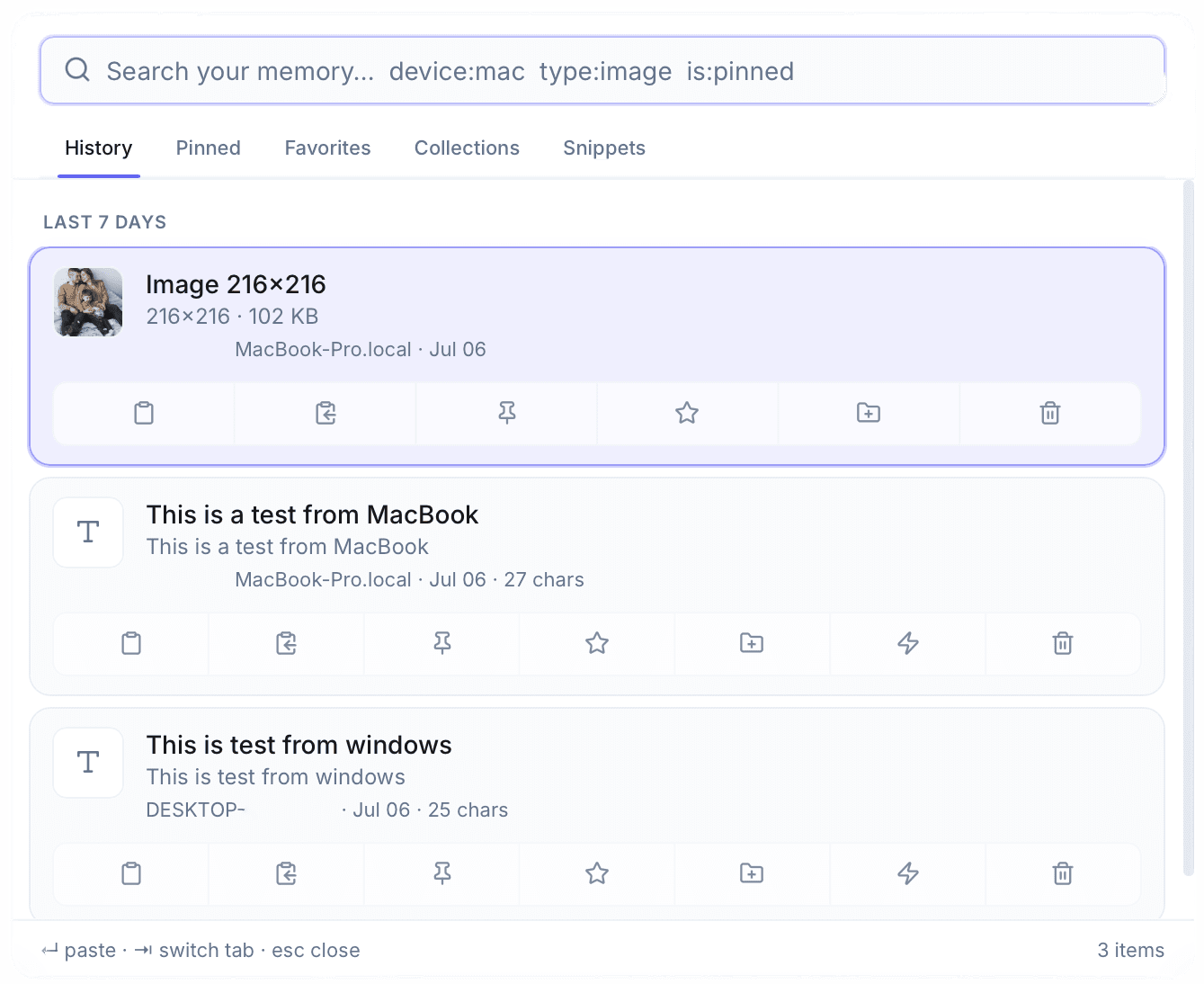
Quick Paste
Open search from anywhere with ⌘⇧V or Ctrl+Shift+V. Find a clip and press Enter to copy it back.
Clipboard History
Text, links, code, and images are captured automatically. Browse history in the tray panel or Quick Paste overlay.
Full-Text Search
SQLite FTS5 search with filters like type:image, is:pinned, and device:mac to narrow results instantly.
End-to-End Encrypted Sync
Optional sync encrypts clip content on your device before upload. The server stores only ciphertext.
Pins and Favorites
Pin important clips and star favorites. Organized items are kept even when history retention expires.
Snippets
Save reusable text as snippets. Edit, search, and paste them like any other clip.
Collections
Group clips by project, client, or workflow. Collections sync across devices when you sign in.
Images
Copy and preview images with thumbnails. Encrypted image blobs sync to your other devices.
Privacy by Default
Password-manager clips marked confidential are never captured. Pause capture anytime from the tray.
Smart Retention
Auto-expire history after 30, 60, or 90 days. Pins, favorites, snippets, and collections are always kept.
Offline First
Everything works without an account or internet. Sign in only when you want cross-device sync.
Menu Bar and Tray
Lives in the macOS menu bar or Windows system tray. No main window to manage.
Product
Built for how you actually work
A tray-first clipboard manager with Quick Paste, full-text search, and optional end-to-end encrypted sync.
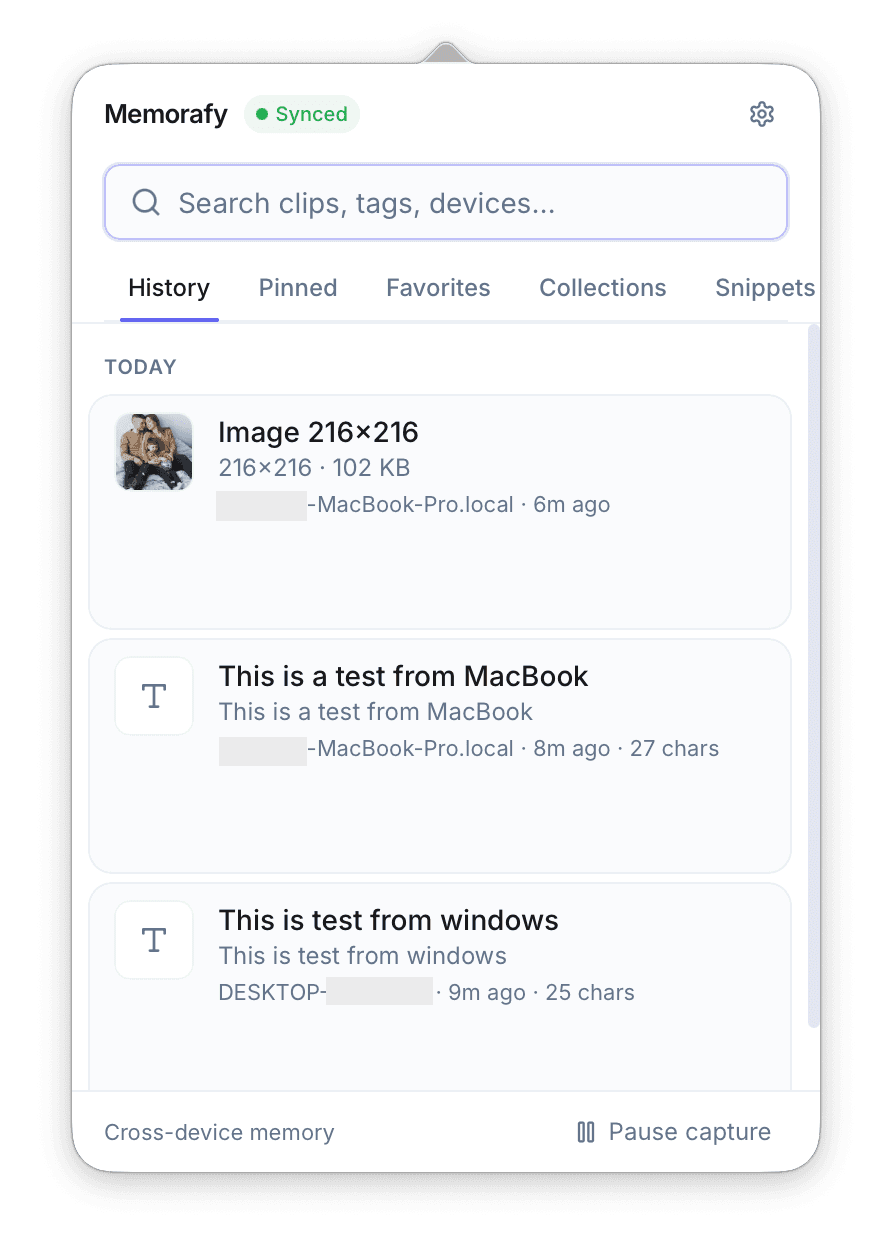
Always one click away
Memorafy lives in the macOS menu bar or Windows system tray. Browse history, pins, favorites, and snippets without leaving your flow.
Why Memorafy
Built for professionals, not just power users
Traditional clipboard tools remember a few recent items. Memorafy gives you searchable history, Quick Paste, and optional encrypted sync.
Privacy
Your data stays yours
Privacy is not a feature we bolt on. It is how Memorafy is built.
Your clipboard belongs to you
Clipboard data is stored locally in SQLite by default. We never read or analyze your clips for ads or profiling.
Offline works perfectly
Every local feature works without an internet connection. Sign in only when you want cross-device sync.
End-to-end encrypted sync
When sync is enabled, clip content is encrypted on your device before upload. The server stores ciphertext only.
No advertising or tracking
No analytics trackers or ad networks in the desktop app. This website does not use third-party tracking scripts.
Sensitive clips excluded
Content marked confidential by password managers is never captured. Pause clipboard capture anytime from the tray.
Transparent architecture
Open source on GitHub. Inspect the sync protocol, encryption implementation, and contribute improvements.
Built for professionals
For everyone who copies for a living
Whether you write code, design interfaces, or manage projects, Memorafy adapts to your workflow.
Open Source
Built in the open
Memorafy is open source under the MIT License. Inspect the code, report issues, and help shape the future.
ishola11/memorafy
Modern cross-platform clipboard workspace
Stars
MIT
License
1
Contributors
Roadmap
Where we are headed
Focused on shipping what matters today, with a clear vision for tomorrow.
Current
Clipboard History and Quick Paste
Automatic capture, tray panel, and a global Quick Paste overlay (⌘⇧V / Ctrl+Shift+V).
End-to-End Encrypted Sync
Optional real-time sync with client-side encryption, email OTP accounts, and image blob sync.
Pins, Favorites, Snippets, and Collections
Organize what matters. Retention policies keep pinned and favorited items safe.
macOS and Windows
Native Tauri apps with menu bar / system tray, onboarding, launch at login, and auto-updates.
Upcoming
Linux Support
Native Linux builds for major distributions.
Advanced Filters
Richer search filters by app, date range, and custom rules.
Import and Export
Migrate from other clipboard managers and export your library.
Future Vision
Personal Knowledge Workspace
Evolve beyond clipboard into a broader capture system.
Team Collaboration
Shared collections and workflows for professional teams.
API and Integrations
Connect Memorafy with your favorite tools.
Enterprise Edition
Admin controls, SSO, and compliance features.
FAQ
Common questions
Everything you need to know about Memorafy.
Ready to upgrade your clipboard?
Download Memorafy for free. Local-first, optionally synced with end-to-end encryption.
Latest version v1.0.1 · Released July 9, 2026